Best WooCommerce My Account Customizer Plugins for Better UX in 2026
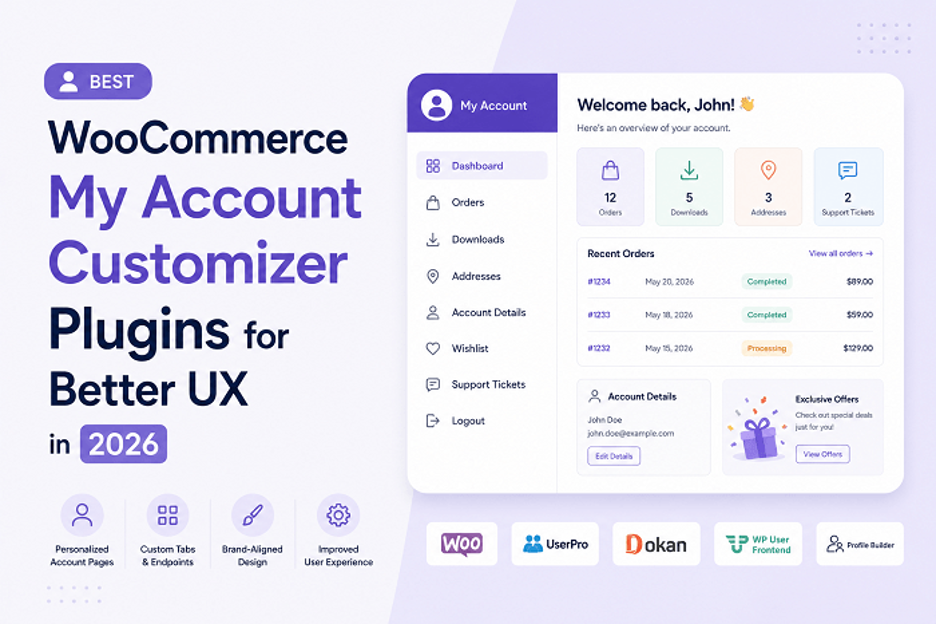
Your WooCommerce my account page is basically your customer relationship hub. It's where customers manage orders, update addresses, check loyalty points, download invoices, and all that stuff. If your account page feels clunky or outdated, customers notice. They get frustrated. They might shop somewhere else.
The problem is that WooCommerce's default my account page is pretty basic. It works, but it doesn't feel special. It doesn't match your brand. It doesn't make customers feel like they're part of something cool.
That's where my account customizer plugins come in. They let you turn your WooCommerce my account page into something actually good. Something that feels custom. Something that keeps customers coming back.
But which plugin should you use? There are several options, and they all do things a bit differently. Some are more flexible. Some are easier to use. Some focus on specific features. I'm going to walk through the best options and help you figure out which one actually makes sense for your store.
1. Customize Account Page & User Dashboard for WooCommerce - Extendons
This is where I'm starting because it's honestly built specifically for what most store owners actually need.
The Extendons plugin gives you two approaches to building your WooCommerce my account page. You can start from scratch with custom endpoints, or you can use their pre-built templates and customize from there.
What makes it different:
The plugin doesn't try to force you into one way of doing things. Some people want complete control. Some people just want a template they can tweak. This plugin handles both.
With the custom dashboard approach, you add endpoints. Each endpoint is basically a section on the account page. You pick what each section shows. You can use a WYSIWYG editor to design the content. You can control which user roles see which endpoints. Everything is organized.
The pre-built templates are actually useful. They're not just generic layouts. They include the common things customers need. Orders, addresses, downloads, account details. You enable what you want, disable what you don't, and customize the styling.
Real features:
- Create unlimited custom endpoints
- WYSIWYG content editor for each section
- Icon support for better visual organization
- User role-based visibility control
- Pre-built templates you can customize
- Edit default WooCommerce endpoints
- Drag and drop endpoint ordering
- Custom styling without coding
Who it works for:
If you want real customization without hiring a developer, this is solid. If you have specific business processes that need to appear on the account page, you can add them. If you want your account page to feel like your brand, you can make it happen.
Price: Varies based on licensing, but reasonable for what you get.
2. Elementor (with WooCommerce Integration)
A lot of people don't realize Elementor can actually customize your WooCommerce my account page. It's not specifically built for it, but it works.
You use Elementor's page builder to rebuild your account page. You add custom sections, rearrange content, change styling, all with drag and drop. If you already have Elementor on your site for other pages, this gives you consistency.
What works:
The visual builder is solid. You see what you're building while you're building it. The flexibility is there if you want it. If you already know Elementor, you already know how to use it.
What doesn't work as well:
Elementor isn't specifically designed for my account page logic. Things like handling endpoint-specific content or user role visibility require custom work. You might end up needing snippets or custom code to make it work exactly how you want.
Best for:
Stores that already use Elementor and want consistency across their site. Brands that have designers comfortable with the builder.
3. Account Custom Dashboard
This is a lighter-weight option that does one thing pretty well. It lets you rebuild your account dashboard with a visual editor.
The approach is straightforward. You create a custom dashboard layout. You add widgets for orders, addresses, account details, whatever. You style it. You save it. It replaces the default account page.
What's useful:
The plugin is simple. Not too many options to overwhelm you. The visual editor is clean. It works specifically for account pages, so the features are focused on what matters there.
Limitations:
You're somewhat limited to what the plugin offers in terms of widgets and features. If you want something custom that the plugin doesn't have built in, you're stuck. No user role-based visibility control, which some stores need.
Best for:
Stores that want a faster implementation and don't need super custom stuff. Smaller stores that just want their account page to look better than default.
4. WooCommerce Customizer (All-in-One)
This plugin tries to do a lot. Customize shop pages, product pages, cart, checkout, and account pages. It's a generalist plugin.
For the account page specifically, you get some customization options. You can hide or show default sections. You can change labels. You can reorder things to some extent.
What it does:
If you want one plugin to handle customization across your whole store, this covers it. The interface is organized. The options are there. It's not the deepest customization, but it covers basics across everything.
The tradeoff:
Because it's trying to do everything, it doesn't go super deep on any one thing. Your account page customization is solid but not revolutionary. You're not getting the same level of control as a plugin built specifically for accounts.
Best for:
Store owners who want one plugin to customize multiple pages and don't need super deep customization on any single page.
5. SeedProd
SeedProd is mainly known for landing pages and homepage builders, but they also have page building capabilities for other areas including WooCommerce pages.
You can use their page builder to create a custom my account page. The interface is clean. The builder is intuitive. It works across different page types so you get consistency.
Real situation:
A store owner used SeedProd to completely redesign their account page. Branded it, added custom sections, made it feel premium. It took maybe an hour of work and the result looked professional.
The thing to know:
SeedProd is doing page building generally, not account page customization specifically. This means you might have to work around things that are account-specific. The integration works, but it's not purpose-built.
Best for:
Designers who already use SeedProd and want to apply that design consistency to their account pages.
6. FlexCart WooCommerce Customizer
This is an older plugin that's been around for a while. It does account page customization through a form-based interface.
You go through options, select what you want, save changes. It's not a visual builder approach. It's more traditional WordPress settings style.
What you get:
Control over what shows on the account page. Reordering options. Basic styling. It works. It's just not as modern in terms of the user experience of customizing.
Why might you use it:
If you prefer traditional settings interfaces over drag and drop builders, you might like this. It's straightforward. It doesn't require learning a new builder.
Fair point:
The interface feels dated. The customization options are less extensive than purpose-built account page plugins. The plugin doesn't get updates as frequently as you'd hope.
Comparing These Plugins Head to Head
Let me break down how these stack up across what actually matters.
Ease of Use:
Extendons Customize Account Page and Elementor are the easiest. They both have visual editors. You see what you're building. Account Custom Dashboard is also straightforward but simpler.
FlexCart uses traditional settings. WooCommerce Customizer is form-based. SeedProd is a builder but requires learning the interface.
Customization Depth:
Extendons gives you unlimited endpoints plus pre-built templates. That's the most flexible combination. Elementor is flexible if you're willing to dig in. Account Custom Dashboard has less depth but covers common needs.
User Role Control:
This is where Extendons really stands out. You can show different content to different user roles on the account page. Most other plugins don't handle this well.
Price:
Account Custom Dashboard is usually cheapest. SeedProd and Elementor are mid-range depending on your plan. Extendons is reasonable for the features. FlexCart varies.
Support and Updates:
Extendons gets regular updates and support. Elementor has huge community support. SeedProd has good support. Account Custom Dashboard and FlexCart are less actively maintained.
Learning Curve:
Extendons is medium. You need to understand endpoints but it's not hard. Elementor is easy if you know Elementor. Account Custom Dashboard is easy. WooCommerce Customizer is very easy but limited. SeedProd is medium.
Real World Use Cases
Let me show you how these plugins handle actual situations.
Scenario 1: High-End Furniture Store with VIP Customers
They need different account page experiences for wholesale customers vs retail customers. They want to show wholesale pricing and bulk ordering options only to verified wholesale accounts.
The Extendons plugin handles this perfectly with user role-based endpoint visibility. You create endpoints showing wholesale-specific content and make them visible only to the wholesale user role. Done.
Most other plugins can't do this without custom code.
Scenario 2: Subscription Box Service
They need to show subscription status, next shipment date, pause/resume options, and upcoming items on the account page. They want it to look branded.
The Extendons WooCommerce my account page plugin works well here. You create custom endpoints for each subscription-related thing. You use the WYSIWYG editor to design it. You add custom content.
SeedProd could work too if you're comfortable building it in their builder.
Scenario 3: Store with Loyalty Program
They want to display loyalty points, redeemable rewards, points history, and tier status prominently on the account page.
The Extendons plugin lets you add endpoints for all this. You can highlight the points section. You can make it prominent.
With Account Custom Dashboard you'd have to work with what's available as widgets.
Scenario 4: Multi-Vendor Marketplace
Vendors need to see their sales, earnings, product listings, and customer reviews in their account area.
This is where most account page plugins start breaking down because they're not built for vendor-specific logic. Extendons could handle it with custom endpoints if you're building the vendor-specific content.
You'd probably need custom development for true vendor dashboards.
Tips for Choosing the Right Plugin
Figure out what your customers actually need on their account page.
Before picking a plugin, write down what should be there. Orders, addresses, downloads, subscriptions, loyalty points, referrals, whatever. Then look for a plugin that handles those things without too much workaround.
Consider whether you need user role differentiation.
If you sell to different customer types who need to see different things, you need user role control. Extendons handles this. Most others don't.
Think about whether you want visual building or settings.
Some people find visual builders intuitive. Some people prefer traditional settings. Pick a plugin that matches how you like to work.
Check if the plugin gets updates.
Plugins that aren't actively maintained can break when WooCommerce updates. Look at the update history. Is the plugin recent?
Test on a staging site first.
Before implementing on your live store, set up the plugin on a staging site. See how it works. See if it's actually doing what you need.
Make sure your hosting can handle it.
Some page builders and plugins are resource-heavy. Check with your hosting that there are no conflicts.
The Bigger Picture
Your WooCommerce my account page is one of the most visited pages on your store. It's where customers spend time. It's where they form opinions about your professionalism. A good account page experience keeps customers engaged. A bad one pushes them away.
The right plugin doesn't just make your account page look better. It makes it work better. It reduces support requests because customers can find and do things themselves. It increases repeat purchases because customers see your brand and remember the good experience.
The Extendons plugin stands out because it was built specifically for this problem. It handles customization depth that other plugins don't. It includes pre-built templates so you don't start from scratch. It includes user role control so you can segment your customers. Those are real features that solve real problems.
But the right plugin for you depends on your situation. If you already have Elementor and know it well, using it might make sense. If you want the simplest option, Account Custom Dashboard works. If you want maximum flexibility and control, Extendons is probably your answer.
Take time to evaluate what your customers need. Pick a plugin that solves for those needs. Test it first. Then implement it and watch how your customer experience improves.
Your WooCommerce my account page doesn't have to be boring. It can be a place where customers feel valued and engaged. That's the difference between a good store and a great one.
About The Author