What Are WooCommerce Product Addons and Why Does Your Store Need Them?
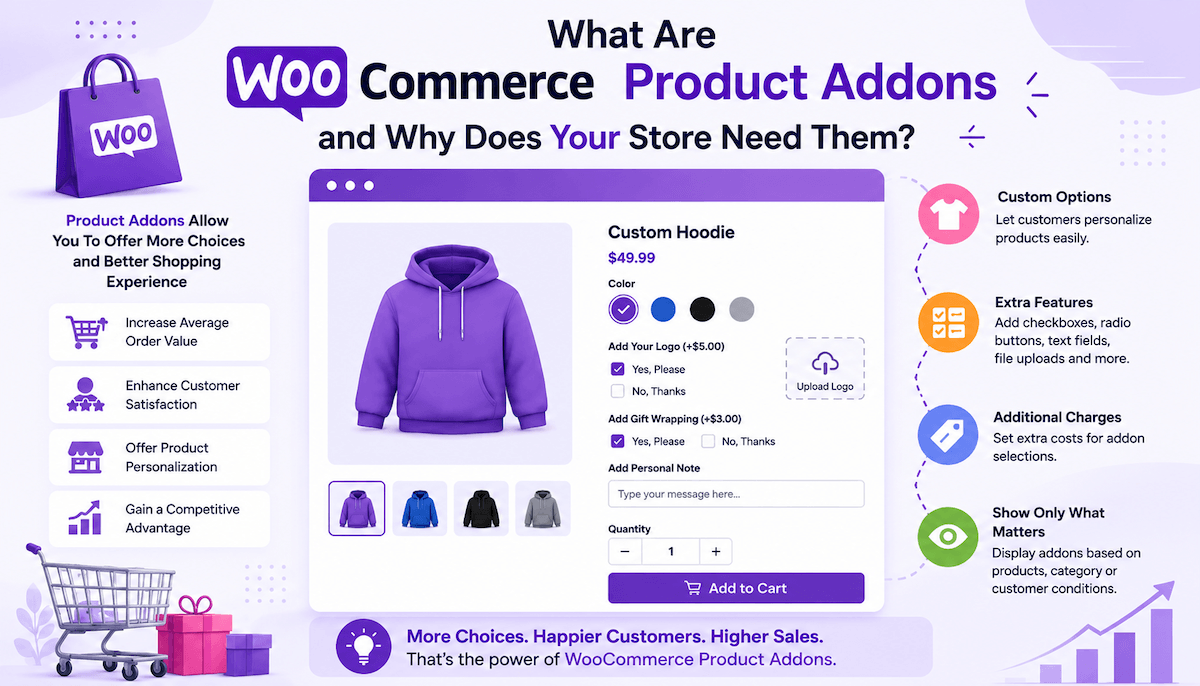
You're running a WooCommerce store. The customer buys a t-shirt. That's it. Plain t-shirt. No customization. No options. No extras. But what if they wanted to add a name? What if they wanted it gift wrapped? What if they needed rush shipping?
Standard WooCommerce doesn't handle this easily. You'd need to create separate products for every combination. One product for a regular shirt. Another for a monogrammed shirt. Another for gift wrapped. Another for rush delivery. Your product catalog explodes. Management becomes impossible.
This is where product add ons WooCommerce come in. Instead of creating fifty separate products you create one product with optional add-ons. Customer adds what they want. Pricing adjusts automatically. You stay organized. Customers get what they need.
Most stores that scale beyond basic operations use product addons because they solve real problems. They increase revenue. They improve customer satisfaction. They reduce operational complexity.
What Are Product Addons Actually?
A product add on WooCommerce is an optional or required field that lets customers customize their purchase beyond standard product variations.
Think of it like this. A t-shirt normally has size and color as variations. Standard stuff. But what if you also want to offer monogramming? Gift wrapping? Rush processing? These aren't variations. They're add-ons.
An add-on is a distinct option that customers can select or configure when purchasing a product. They're optional usually. Customer can skip them. Or they can select them. Or they might be required depending on your setup.
The add-on can affect pricing. Monogramming adds $5. Gift wrapping adds $3. Rush shipping adds $10. When customer selects these options the price updates automatically showing the new total.
Add-ons appear on the product page, not as separate products. Customer sees the main product. They see options to add monogramming. Options to add gift wrapping. They add what they want and checkout. One product. Multiple customization possibilities.
What About Extra Fields?
Extra fields are the specific input mechanisms customers use to configure their add-ons.
A text field where they enter their name for monogramming. A dropdown where they choose gift wrap color. A checkbox where they decide if they want rush shipping. A date picker where they select their desired delivery date.
WooCommerce product addons support 19 different field types. Text fields. Dropdowns. Checkboxes. Radio buttons. Date pickers. Time selectors. Color swatches. File uploads. Multiple select boxes. And more.
Each field type serves different purposes. Text fields for names and text. Dropdowns for choosing from predefined options. Checkboxes for yes/no decisions. Color swatches for visual selection. The variety lets you build exactly the customization experience you need.
These extra fields are what customers interact with. They type in fields. Select from dropdowns. Click checkboxes. Upload files. The fields make customization possible.
Why Your Store Actually Needs Product Addons
Several reasons product add ons WooCommerce matter for growing businesses.
Revenue Increase
Add-ons are profit multipliers. Customer buys a $20 shirt. Without add-ons that's your revenue. With add-ons? Customer adds monogramming for $8. Adds gift wrapping for $5. Adds rush shipping for $10. Same customer, now spending $43 instead of $20. That's 115% increase in transaction value from the same person.
Multiply that across thousands of customers and you're talking meaningful revenue increases.
Better Customer Experience
Instead of hunting through your catalog for different product variations customers customize exactly what they want in one place. They see all options. They select what matters to them. They checkout. Simple. Clean. Professional.
When experiences are smooth customers are happier. Happier customers leave better reviews. Recommend your store. Buy again.
Operational Simplicity
Without add-ons you manage fifty different products for fifty different combinations. Inventory becomes complicated. Price management becomes messy. Updates require changing multiple products.
With add-ons you manage one product with add-on options. Inventory is simpler. Pricing is centralized. Updates change one product not fifty.
Competitive Advantage
Stores without customization look generic. Stores with customization look professional. When customers can personalize purchases they feel valued. They're not just buying off the shelf. They're creating something custom for themselves.
That differentiation matters.
Methods to Apply Product Addons
Several approaches exist for adding custom options to WooCommerce products.
Manual Custom Code
You could hire a developer to write custom code adding options to your products. This works but it's expensive. Every change requires developer involvement. Not practical for most stores.
Basic Plugins
Some plugins handle basic product addons. Text fields. Simple dropdowns. That's it. Limited functionality. Limited customization. They work for very simple needs but break down fast.
Comprehensive Addon Solutions
A full-featured product addon system gives you 19 field types. Conditional logic. Flexible pricing. Advanced customization. Stock management. This is what actually works for serious e-commerce stores.
The Product Addons and Extra Options plugin by Extendons falls into this category. It's built for stores that need real customization power.
Understanding Product Addons and Extra Options Plugin
The Product Add on WooCommerce plugin by Extendons gives you a complete system for adding unlimited customization options to your WooCommerce products.
Instead of writing code or dealing with limited solutions this plugin provides a visual interface where you create add-ons using 19 different field types. Text fields. Dropdowns. Checkboxes. Radio buttons. Date pickers. Color swatches. Image radio buttons. File uploads. And more.
You set individual pricing for each add-on option. Free or charged. Fixed price or percentage. Per-character pricing for text fields. Price multiplied by quantity ordered. Flexible enough for any pricing model.
Apply add-ons globally to multiple products at once or configure product-specific add-ons for individual items. The flexibility means you handle simple products and complex products using the same system.
Conditional logic lets you show or hide options based on customer selections. Customer picks one option and another option automatically appears or disappears. Keeps the interface clean and focused.
Step-by-Step Setup Process
Getting started is straightforward.
Step One: Installation
Download the Product Addons and Extra Options plugin from your Extendons account. Go to WordPress Admin > Plugins > Add New. Upload the plugin file. Click Install Now and Activate.
Step Two: Access Configuration
Navigate to WooCommerce > Settings. You'll see a Product Addons tab. Click it. This is where you configure everything.
Step Three: Create a Rule
Click Add New to create your first rule. Name it something meaningful. Decide if this rule applies to specific products or entire categories. Choose your products or categories.
Step Four: Add Fields
Click Add New Option to add fields to your rule. Choose your field type from the 19 available options. Set the field title. Decide if it's required or optional. Set pricing if applicable.
Step Five: Configure Field-Specific Settings
Depending on field type, you'll see different options. For text fields you can set character limits and character-based pricing. For dropdowns you add the specific options customers can choose from. For image radio buttons you upload images for visual selection.
Step Six: Set Conditional Logic (Optional)
If you want certain fields to appear only when specific conditions are met, set conditional logic. Show this field only if customer selects this option. Hide this field if customer selects that option.
Step Seven: Save and Publish
Save your rule. It applies automatically to the products or categories you selected. The add-ons appear on the product pages. Customers can immediately customize.
For Product-Specific Options
If you want to add custom options to individual products, go to Products > All Products. Open the specific product. Scroll to the Product Addons section. Add options specifically for that product.
Benefits of Using Product Addons
Implementing WooCommerce product addons delivers concrete benefits:
Increased Average Order Value - Customers add options. Transaction values increase. Same traffic. More revenue.
Reduced Product Catalog Complexity - One product with multiple add-ons instead of dozens of similar products. Easier management. Cleaner inventory.
Flexible Customization Options - 19 field types support almost any customization need. Text. Images. Dates. Colors. Quantities. Whatever you need.
Automatic Price Calculation - Prices update automatically when customers select add-ons. No manual calculation. No customer confusion about final cost.
Stock Management for Options - Track inventory for add-on options themselves. Ensure customers can only select options currently in stock.
Price Per Character Functionality - Charge based on how much text customers add. Perfect for personalized products like monogrammed items.
Role-Based Field Visibility - Show different add-ons to different customer types. Wholesale customers see wholesale options. Retail customers see retail options.
Conditional Field Logic - Show or hide fields based on customer selections. Keep interfaces clean and focused.
Global and Product-Specific Options - Apply options store-wide or create unique options for specific products.
Better Customer Control - Customers customize exactly what they want. No guessing about what's available. No missing options.
Improved Customer Satisfaction - When customization is easy and intuitive customers are happy. Happy customers return and recommend.
Professional Store Appearance - Stores with sophisticated customization options look professional. Look trustworthy. Look established.
Support Reduction - When options are clear and customization is intuitive customers need less support. Fewer questions. Fewer corrections.
Conclusion
Product addons transform how e-commerce stores operate. They increase revenue per transaction. They simplify operations. They improve customer satisfaction. They provide competitive advantage.
WooCommerce product addons aren't luxury features. They're essential tools for stores that want to scale beyond basic operations. Whether you need simple monogramming options or complex multi-field customization, having the right system matters.
A comprehensive product addon solution like the Product Addons and Extra Options plugin gives you the flexibility and functionality to handle virtually any customization scenario. With 19 field types, flexible pricing, conditional logic, and easy management, you can create sophisticated customer experiences without technical complexity.
The stores scaling fastest are the ones that make customization seamless for customers. Easy customization drives revenue. Drives satisfaction. Drives growth.
Your store probably needs product addons more than you realize.
About The Author