Quickmunch Restaurant Food SaaS WordPress Theme
byMetropolitan host
from United States Categories Food, Restaurants, Themes Colours Red Pink WhiteMore Info
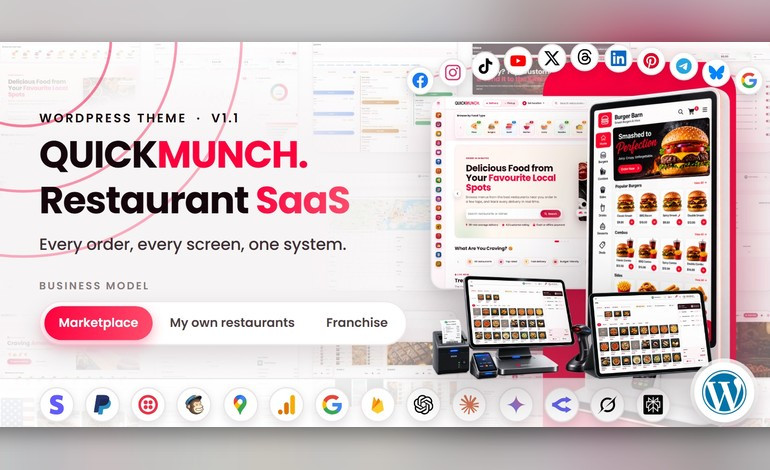
Quickmunch is a complete multi-restaurant food ordering, delivery and point-of-sale platform for WordPress, built on WooCommerce. It gives restaurant groups, food delivery startups, franchise operators and marketplace owners a fully working online ordering business on the platform they already know — installed like any theme, and run from wp-admin and its own dashboards. A theme and two companion plugins cover the whole ecosystem: vendor management, live order tracking, kitchen and floor operations, self-service ordering and secure checkout through WooCommerce's payment gateways — with a modern, responsive design for administrators, restaurants, staff, drivers and customers alike. Run it as a commission marketplace, as the operating system for your own chain of venues, or as a franchise network billing royalties — one install, three business models, switchable from the dashboard. Whether you are launching a single venue or building a delivery marketplace, Quickmunch gives you the tools to manage menus, take orders, coordinate deliveries, watch revenue and grow — without writing code. Why Quickmunch Is Different Most restaurant themes are a storefront. Quickmunch is the whole restaurant stack inside WordPress — what would usually be five or six separate plugins, sharing one database, one menu and one set of dashboards: - Kitchen display system — a live order pipeline for the kitchen, fed by every channel: online, POS, kiosk or table QR. - TV menu screens — digital menu boards drawn from the same menu data, so prices and availability change on the dining-room screens the moment you change them. - AI assistant — in-dashboard help that answers from the restaurant's own data, typed or spoken: the voice orb listens and reads the answer aloud. Bring your own provider key. - Quick Social — every restaurant posts to Facebook, Instagram, Threads, X, TikTok, YouTube, Pinterest, LinkedIn, Telegram and Bluesky from its own dashboard, starting from a dish, with a calendar and image and video studios. - Three business models, one install — commission marketplace, your own chain of venues, or a franchise network billing royalties — switched from the dashboard with no code changes. - Complete online storefront — delivery, pickup and dine-in, WooCommerce checkout, deals and loyalty, on a responsive, themable front end. - Full POS — a counter point-of-sale with cash handling, receipt printing and shift reports. - Self-order kiosks — a touchscreen ordering mode for in-venue kiosks, running from the same install. - QR table ordering & dine-in — guests scan and order from the table, and the order lands in the same kitchen pipeline as everything else. - Reservations & printable menus — table bookings from the storefront, plus print-ready menus generated from the live menu data. - Three page builders — WPBakery Page Builder bundled, and every one of the 68 section elements also available as a Gutenberg block and an Elementor widget. Three Business Models, One Product Every install starts as a marketplace and switches whenever you like from the dashboard — every screen adapts to the model you run: - Marketplace — independent restaurants. You collect payments, pay each restaurant its share and keep a commission, with statements and payouts built in. - My own restaurants — one owner, many venues. All revenue is yours, consolidated. No payouts, no commission. - Franchise — each restaurant takes its own payments. You charge a royalty on their sales. How You Make Money (four income streams) - Commission on every order — set your percentage and the platform takes it off each order automatically; each restaurant's balance goes to its payouts, with statements for both sides (marketplace model). - Subscription plans — restaurants pay you monthly or yearly to be on the platform, with free, trial and paid tiers and a feature matrix, paid through your WooCommerce gateways. A restaurant can pay a plan instead of a percentage, or both — your pricing, your rules. - Sponsored ads — restaurants buy placements across your storefront, pay online through the same gateways, and the placement goes live, with admin pricing and a revenue report. - Royalty — in the franchise model each restaurant takes its own payments and you invoice a royalty on their sales. Every stream lands in admin reporting: platform earnings, recurring revenue, ad revenue and payout statements. White-Label: Your Brand on All of It - Your logo, site icon and brand colours — set once in Theme Options and carried across the storefront and the dashboards - Your site name, pages, menus, header and footer — set your own name and footer text, and nothing in the product names Quickmunch to your customers - Sell only what your market buys — delivery, pickup, dine-in, reservations, loyalty, restaurant sign-up and sponsored ads each have their own switch Customer Storefront - A homepage built from arrangeable sections, cuisine and dietary classifications with their own pages, and search - Full menu with categories, a dish pop-up with options, add-ons and a live total, and a cart that updates without reloading - WooCommerce checkout — cash on delivery plus Stripe, PayPal, Square, Mollie, Razorpay, Paystack, Flutterwave, Mercado Pago and Payfast gateways - Tips, delivery zones, coupons and platform-wide deals - Live order tracking on a map - Reviews, saved addresses, loyalty points and order history in the customer's account - Table reservations from the storefront Restaurant Operations - A dashboard with today's figures, sales trends and the orders in progress - Orders with status changes, driver assignment and cancellation reasons - Reservations, and tables with their own status - Menu: dishes with options, categories, a menu archive, upsells, and import from a CSV file or from another of your venues - Inventory with stock levels - A customer book and a per-restaurant loyalty programme - Branches for multi-venue owners — every venue side by side, and one click to work in any of them - An AI assistant that answers from the restaurant's own dashboard data, typed or spoken through the voice orb — bring your own provider key Quick Social Every restaurant publishes to its social accounts from the same dashboard it runs the kitchen from — no third-party scheduler, no per-seat fee: - Ten networks — Facebook, Instagram, Threads, X, TikTok, YouTube, Pinterest, LinkedIn, Telegram and Bluesky, each connected per restaurant on its Channels screen - Campaigns from a dish — pick a dish and the post is filled: name and price, description, photograph and the restaurant's page as the link; one preview per channel, its own text per channel if wanted, Write with AI, drafts, scheduling and publish-all - Native video — YouTube, TikTok, Instagram Reels, Facebook Reels and Pinterest video pins, each with its own settings - Calendar, archives and logs — day, week and month views with drag to reschedule; record pages that update or take down a post where the network allows; every run channel by channel with retries - Image studio and Video studio — restaurant templates with the price, moods that keep the food looking like food, text and shape layers; trim, reframe, caption and render video on your own server with FFmpeg - Yours to run — register each network's app once, or let every restaurant bring its own; cap channels, monthly sends and AI captions per restaurant Devices & Printing - POS with a table picker, cash handling and shift reports - Card, cash or a payment QR the guest scans — or a payment link sent straight to their phone - Kiosks and QR scan-to-order at the table — the guest orders and pays on their own phone, and the order already knows which table it came from - Kitchen display (KDS): every channel lands on one board - TV screens (digital menu boards): pair a display and it shows the live menu - The boards themselves, composed in the dashboard from the live menu - Printable menus laid out from the live menu, ready for the print shop - Device settings, and cancellation and refund reasons, per venue Staff & Reports - Scoped staff roles — manager and kitchen — each with their own screen set - Staff and shift management - Six restaurant reports: sales, menu, item, reservations, customers and operations Driver / Rider - Delivery zones and delivery fees - Assigned deliveries and status updates from the driver's own app - Live position on the delivery map, shared with the customer tracking the order Super-Admin - Restaurants, users, classifications, deals and loyalty, from the operator dashboard - Money: plans, subscriptions, payouts, sponsored ads, the business model and platform earnings - Website & content: WordPress pages and blog, Theme Options for header, footer and colours, mega menus and page layouts - Messaging: branded email templates with a switch each, SMS through Twilio, newsletter sign-ups with Mailchimp, a subscriber list and contact forms - Maintenance mode with a timed reopen - Tools: the Quick Social switch, the channels offered, the network apps and the limits per restaurant What’s Included - The Quickmunch theme, and a child theme for your own changes - The Sigma Core and Sigma Restaurant plugins, plus WPBakery Page Builder - Two one-click demos — one built with WPBakery, one with Elementor - 68 section elements for WPBakery, Gutenberg and Elementor - 126-page HTML documentation that filters by reader role and business model — every screen in the product has a page - Translation-ready — .pot files for the theme and both plugins — with right-to-left stylesheets - Fonts, icons and scripts ship with the theme and plugins, served from your own server Server Requirements - WordPress 7.0+ and WooCommerce - PHP 7.4+ (8.2 recommended) with mysqli, GD or Imagick, mbstring, curl and XML - MySQL 5.7+ / MariaDB 10.4+ - An upload limit of 64 MB for the theme file; Apache (mod_rewrite) or Nginx; HTTPS recommended (card payments want a secure address) - FFmpeg on the server, for the Video studio only (optional) Browser Compatibility - Chrome and Edge 111+, Firefox 113+, Safari 16.4+, and the current Chrome/Safari on Android and iOS - Responsive from 360 px phones through tablets to desktop - Right-to-left stylesheets included, so Arabic renders as a proper right-to-left layout rather than a mirror - Internet Explorer is not supported Third-Party Integrations (optional, off by default) A default install runs with every integration switched off; each one activates only when you add your own key: - Card payments — through WooCommerce's payment gateways; cash on delivery works with no keys at all - SMS — Twilio - Email marketing — Mailchimp, through MC4WP - AI — bring your own provider key for the restaurant assistant, its voice and the social captions; you must provide your own privacy notice per your provider’s terms - Maps — optional map provider keys for location search and delivery maps - Social networks — Facebook, Instagram, Threads, X, TikTok, YouTube, Pinterest and LinkedIn through your own developer apps (or each restaurant's); Telegram and Bluesky with a bot token or an app password, no app needed Support & Updates - Documentation covers installing, updating, configuration and every screen, with a troubleshooting guide, FAQ and glossary - Support is provided through the item support form on this page Credits (all bundled locally, license-compliant) - Bootstrap, Popper, Slick, Magnific Popup, SweetAlert2, ApexCharts (MIT) and Leaflet (BSD); Isotope (GPLv3) - Font Awesome 5 Free (CC BY 4.0 / SIL OFL / MIT); Poppins and Noto Sans Arabic (SIL OFL); Anton, Bebas Neue, Cinzel, Oswald and Playfair Display (SIL OFL), bundled for the studios - WPBakery Page Builder, bundled for use with this theme - All images are used for demo purposes only. Replace them with your own licensed imagery before going live.