WooCommerce Product Table Features: Bulk Ordering, Quotes, and Advanced Filtering Explained
The standard WooCommerce shop page serves retail customers well. Attractive product images, detailed descriptions, individual add-to-cart buttons. This design works when customers buy one or two items at a time.
But wholesale buyers, B2B customers, and high-volume retailers operate differently. They have lists. They need efficiency. They want to select 30 products, specify quantities, and checkout in minutes, not hours. The default WooCommerce layout frustrates these customers.
This is where a WooCommerce product table plugin transforms the entire buying experience. Instead of navigating product pages individually, customers view all products in organized rows, select multiple items simultaneously, and complete bulk orders with unprecedented efficiency. Beyond bulk operations, modern product table solutions include sophisticated quote request systems and advanced filtering capabilities that serve every type of wholesale customer.
This guide explores these powerful features and how they work together to create the most efficient ordering experience for your wholesale and B2B customers.
Understanding the WooCommerce Product Table: Beyond the Default Grid
Before exploring individual features, understanding what a product table plugin actually is clarifies why it matters so much for specific customer segments.
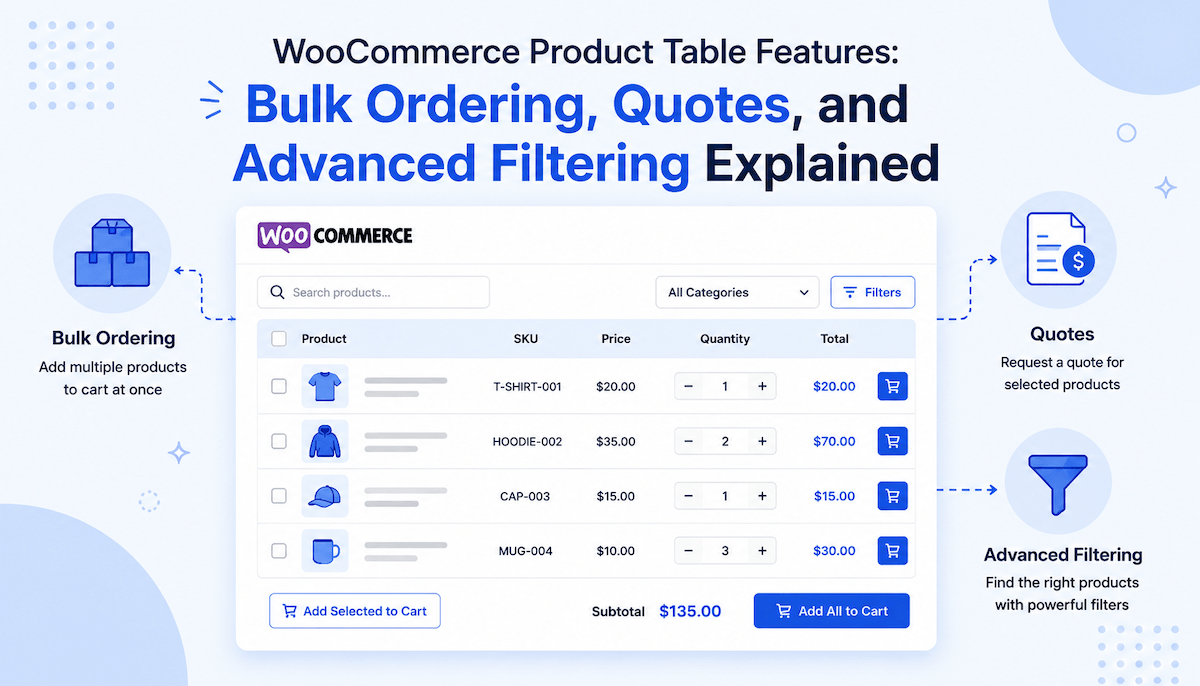
A WooCommerce product table replaces your default shop grid with a tabular layout. Instead of products displayed as cards in a grid, products appear as rows in a table. Each row represents one product. Columns display key information: product image, name, SKU, price, stock status, and action buttons.
This layout shift seems simple but creates profound usability differences. Grid layouts optimize for browsing and discovery. Product tables optimize for efficient scanning and bulk selection. When a buyer needs 30 products, they can scan and select them far faster in a table than clicking through a grid.
The product table plugin adds intelligence to this basic layout. It's not just a visual redesign. It's a functional system enabling bulk operations, smart filtering, and quote requests, features that become essential for stores serving wholesale and B2B customers.
How Bulk Ordering Transforms Wholesale Shopping
Bulk ordering is the reason most customers use a product table for WooCommerce. Understanding why bulk operations matter clarifies the entire feature set.
Traditional WooCommerce shopping requires customers to add products individually. Click a product page. Select quantity. Click add to cart. Navigate back. Repeat 30 times. This workflow takes 30-45 minutes for a moderate order. Customers get frustrated. Some abandon carts. Others switch to competitors offering faster ordering.
Bulk ordering eliminates this friction completely. Customers see all products in one view. They select multiple products using checkboxes. They set quantities for each selected item. A single bulk button adds everything to cart simultaneously. The same 30-product order takes 5-10 minutes.
This efficiency matters financially. Wholesale buyers make faster decisions when ordering is fast. They're more likely to complete purchases. They're more likely to return for repeat orders. Studies show conversion rates for bulk ordering features increase 20-40% compared to traditional product navigation.
The bulk ordering feature in a WooCommerce product table plugin is so fundamental that it's often the primary reason stores implement the system.
Enabling and Using Bulk Add to Cart Features
Understanding how bulk add to cart actually works helps you appreciate the sophistication behind what seems like a simple feature.
When you enable bulk operations in your product table for WooCommerce settings, several things happen automatically. Checkboxes appear beside each product row. Quantity input fields appear for selected items. A bulk button emerges above the table showing the total quantity and price as customers select items.
The magic happens in real-time. When a customer checks a product, the bulk button activates and shows "Add 1 item for $X.XX." When they select three products and specify quantities totaling 50 units, the button updates to "Add 50 items for $Y.YY." This dynamic feedback shows customers exactly what they're adding before confirmation.
For customers ordering frequently, this efficiency compounds. A customer placing weekly orders can complete their ordering in 15 minutes instead of an hour. Over a year, that's 35+ hours saved. For wholesale operations, this time savings translates directly to productivity gains.
The WooCommerce product table plugin customizes bulk button text to match your store's voice. Instead of generic "Add items to cart," you might use "Add to Order" or "Place Bulk Order." This personalization makes the experience feel intentional rather than default.
The Quote Request System: Serving Buyers Who Need Pricing Flexibility
Not every wholesale customer is ready to purchase immediately. Some need custom pricing. Some want to evaluate options before committing. Some require approval before ordering. For these customers, quote request systems bridge the gap between browsing and purchasing.
A modern woo product table includes built-in quote request functionality. Customers can request quotes on individual products or submit bulk quote requests for multiple items selected from your WooCommerce table. Instead of contacting sales manually or sending inquiry emails, the entire quote process happens within your store.
When customers submit a quote request, your sales team receives notification. All products, quantities, and customer information are captured automatically. Your team responds with pricing, customization options, or delivery timelines. The streamlined process transforms quote-based selling from a manual, email-heavy workflow into an organized, systematic process.
Quote requests serve a critical business function. They capture sales that aren't ready for immediate purchase. Without quote systems, these customers might shop competitors or never return. With proper quote functionality, you capture their inquiry, engage your sales team, and convert many to customers.
Advanced Filtering: Making Product Discovery Effortless
Bulk ordering efficiency depends partly on filtering. Imagine a customer needing to review 500 products to find the 30 they want to order. Efficiency disappears if browsing takes longer than selection.
Advanced filtering in a WooCommerce product table plugin allows customers to narrow product lists instantly. Multiple filter types work together:
Category Filters let customers restrict products to specific categories. A wholesale buyer ordering apparel might filter to "Shirts" then "Long Sleeve" then "Blue Colors." Each filter narrows the list intelligently.
Price Range Filters show only products within specified price ranges. Buyers can exclude budget items or premium items depending on their needs.
Attribute Filters work with product attributes like size, color, material, or brand. Filters display dynamically based on products currently in view, preventing customers from selecting filter combinations with zero results.
Search Functionality provides AJAX-powered instant search. As customers type, results filter in real-time. Searching for "blue" instantly shows only blue products. This speed is critical for large catalogs.
Sort Options let customers reorder products by name, price, newest, or popularity. A wholesale buyer might sort by price ascending to find budget options or by popularity to see best-sellers.
These filtering tools combine to transform a large product table into a focused list matching each customer's specific needs. A customer browsing 500 products might filter to 15 using category, attribute, and price filters, then search for specific items. What could have taken 30 minutes now takes 2-3 minutes.
The intelligence of advanced filtering in a product table WooCommerce system is that filters update dynamically. When a customer selects "Blue" in a color filter, other filters adjust to show only options available for blue products. This prevents dead-end filter combinations and keeps the browsing experience smooth.
How Bulk Operations and Quote Systems Work Together
Individual features matter, but their interaction creates the real power. Bulk ordering and quote requests aren't separate systems; they work together to serve the complete wholesale buying journey.
A customer might browse your product table, select 20 items they're interested in, and submit a bulk quote request instead of adding to cart. Your sales team reviews the quote, prepares custom pricing, and responds. The customer reviews your proposal and either converts to an order or modifies their selection and resubmits.
Alternatively, a returning customer with a standing order uses the same table to add their regular items to cart via bulk add to cart, then processes checkout quickly.
Different customers have different buying patterns. Some are ready to purchase. Some need quotes. The WooCommerce product table plugin accommodates both, ensuring no customer falls through the cracks due to inflexible ordering processes.
Filtering as the Gateway to Bulk Ordering Efficiency
Advanced filtering doesn't just help customers browse. It directly allows bulk ordering efficiency. Without filtering, bulk ordering loses its advantage in large catalogs.
Consider a store with 2,000 products. Without filters, bulk ordering still requires customers to scroll through thousands of items to find the 30 they want. Filtering changes this entirely. A few filter selections reduce the list to 50-100 relevant items. Customers scan through these, select their items, and bulk order. The entire process, from browsing to checkout, takes 10-15 minutes.
This is why a complete WooCommerce product table plugin includes all three capabilities: filtering for discovery, bulk ordering for efficiency, and quote systems for flexibility. Each feature amplifies the others.
Real-World Impact: How These Features Drive Business Results
Understanding features intellectually is one thing. Seeing actual business impact clarifies their importance.
Stores implementing bulk ordering features see 25-40% increases in wholesale order conversion rates. Customers appreciate the efficiency so much that they're more likely to complete purchases.
Wholesale order values increase 15-30% on average. Bulk ordering reduces friction around larger orders. Customers who might have ordered 10 items individually now order 15-20 because the ordering process is equally fast regardless of quantity.
Quote request systems capture 10-20% of browsers who weren't ready to purchase immediately. Without quote systems, these customers are lost. With quote systems, they submit requests, receive responses, and often convert.
Average response time to quote requests drops dramatically. Instead of back-and-forth emails about what the customer wanted, all information is pre-captured. Sales teams respond faster. Conversion rates on quotes improve.
Return and error rates for custom orders decrease significantly. When customers can filter to exactly what they need and bulk add quantities correctly, ordering errors plummet. Fewer returns mean lower fulfillment costs and better profitability.
Best Practices for Implementing Product Table Features
Understanding features is foundational. Using them effectively requires attention to configuration and customer communication.
Set Realistic Filtering Options
Include filters customers actually use. Offering 50 filter options confuses. Offering 3-5 key filters allows quick narrowing. Evaluate which attributes your wholesale customers care about and create filters around those.
Customize Button Text for Your Audience
Generic "Add to Cart" doesn't resonate with wholesale buyers. Customize to "Add to Order," "Place Bulk Order," or "Order Selected Items." This language shift makes the feature feel designed specifically for wholesale operations.
Communicate Quote Response Timelines
Tell customers how long quote responses take. "We respond to quote requests within 24 business hours" sets expectations. Meeting expectations builds trust and increases conversion likelihood.
Display Pricing Transparently
Wholesale customers want to understand pricing structure. Display unit pricing clearly. If you offer tiered pricing (different rates for different quantities), show the tiers. Transparency builds confidence and reduces support questions.
Organize Products Logically
Categories and attributes should reflect how customers think about products. If your wholesale buyers think in terms of product lines, create categories matching those lines. If they think in terms of size ranges or price tiers, structure your products accordingly.
Test on Mobile
Many wholesale orders happen on mobile devices. Test that checkboxes are easily tappable, quantity inputs work smoothly, and bulk buttons function properly on phones and tablets.
Monitor Quote Requests Daily
Quote requests are sales opportunities. Respond promptly. A quote request sitting unresponded for a week loses the customer. Daily review and quick responses dramatically improve conversion.
Conclusion: Product Table Features as Wholesale Growth Engine
A WooCommerce product table plugin with bulk ordering, quote requests, and advanced filtering solves the core problem of wholesale e-commerce: getting customers through ordering as efficiently as possible.
Retail customers browse leisurely and buy occasionally. Wholesale customers have lists and order regularly. Efficient ordering systems aren't nice-to-have for wholesale businesses; they're essential. Stores without them lose customers to competitors who have invested in proper wholesale infrastructure.
The cumulative impact of these features is substantial. Better filtering means customers find products faster. Bulk ordering means they select and checkout faster. Quote systems capture sales that aren't immediately ready. Together, these features can increase wholesale revenue by 30-50%.
If your WooCommerce store serves wholesale or B2B customers, implementing a product table for WooCommerce solution with these capabilities should be a priority. Start with your highest-volume wholesale products. Configure filtering, enable bulk operations, and set up quote requests. Monitor the results. Then expand to your full catalog.
Your wholesale customers will appreciate the efficiency. Your sales team will appreciate the organized quote requests. Your bottom line will appreciate the increased order values and conversion rates.
Product tables aren't just a better way to display products. They're wholesale infrastructure transforming how your business scales.
About The Author