How to Speed Up Wholesale Ordering in WooCommerce?
Introduction
Wholesale buyers shop differently than regular retail customers. Instead of spending time browsing product pages one by one, they usually know exactly what they need. Their goal is simple: find products quickly, compare information, enter quantities, and place a large order with as few clicks as possible.
Unfortunately, the default WooCommerce shop experience isn't built for that type of buyer. Opening dozens of product pages, selecting variations individually, and repeatedly adding items to the cart can turn a simple wholesale purchase into a slow and frustrating process.
If your store serves wholesalers, distributors, B2B customers, restaurants, retailers, or bulk buyers, simplifying the ordering process can make a noticeable difference. Faster ordering often leads to larger purchases, fewer abandoned carts, and a much better customer experience.
In this guide, we'll look at several practical ways to speed up wholesale ordering in WooCommerce, including one solution that combines multiple improvements into a single workflow.
Why Wholesale Ordering Should Be Fast
Wholesale customers rarely shop the same way as everyday consumers.
A retail customer might spend several minutes reading product descriptions, viewing images, and comparing different products before making a purchase. Wholesale buyers usually skip this stage entirely. They're purchasing inventory rather than browsing for inspiration.
The more time it takes them to complete an order, the greater the chance they'll become frustrated or postpone the purchase altogether.
A faster ordering experience benefits both your customers and your business by:
- Reducing unnecessary clicks during ordering
- Making large catalogs easier to browse
- Helping customers locate products instantly
- Encouraging larger bulk purchases
- Reducing support requests related to product availability or ordering
- Making repeat purchases significantly faster
The easier it becomes for customers to place large orders, the more likely they are to continue buying from your store instead of looking elsewhere.
Ways to Speed Up Wholesale Ordering in WooCommerce
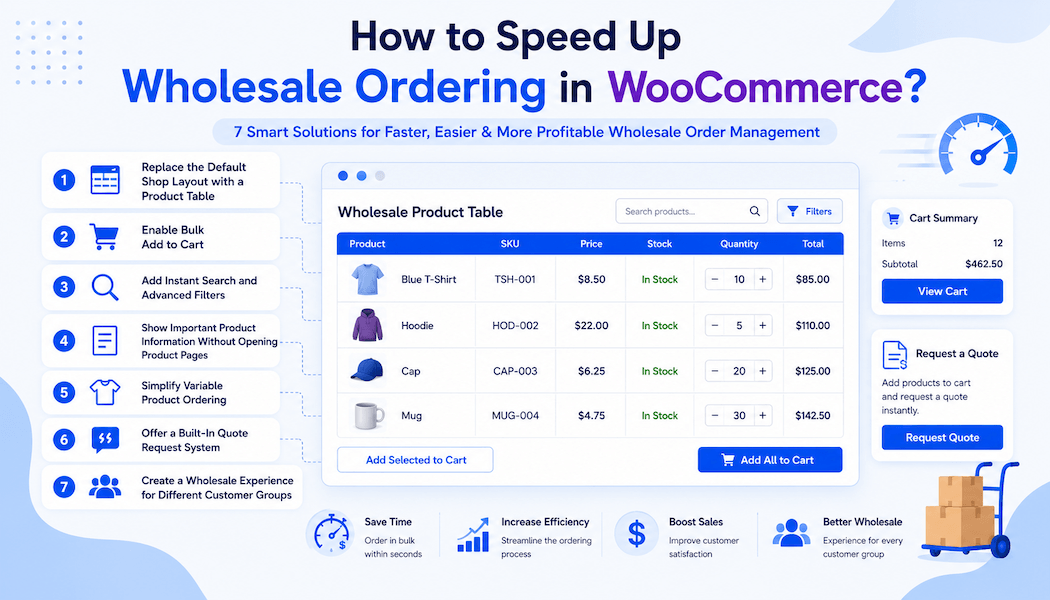
1. Replace the Default Shop Layout with a Product Table
One of the biggest reasons wholesale stores feel slow is because WooCommerce displays products in a traditional grid.
While this layout works well for retail stores, it becomes inefficient once customers need to browse hundreds or thousands of products.
A table layout solves this problem by displaying essential information in one organized view.
Instead of opening dozens of individual product pages, customers can immediately see:
- Product image
- Product name
- SKU
- Price
- Stock status
- Quantity selector
- Add to Cart button
Everything becomes available from a single page.
There are various plugins out there that might help you with this, but the Product Table for WooCommerce by Extendons may be at the top of that list.
Rather than simply changing the appearance of your store, it completely changes how wholesale customers shop.
Some of the features that help speed up ordering include:
- Unlimited customizable product tables
- Drag-and-drop table builder
- AJAX-powered instant search
- Category, brand, tag, attribute, and price filters
- Bulk Add to Cart
- Variable product support
- Wholesale variation matrix
- Sticky table headers
- CSV and PDF price exports
- User role visibility controls
Instead of moving between multiple pages, buyers can search, compare, select quantities, and complete large purchases without interrupting their workflow.
For stores with extensive catalogs, this alone can significantly reduce the time needed to place an order.
2. Enable Bulk Add to Cart
Wholesale customers rarely purchase one item.
More commonly, they'll order dozens—or even hundreds—of products in a single session.
Making customers click "Add to Cart" repeatedly creates unnecessary friction.
A better approach is allowing buyers to:
- Select multiple products
- Enter quantities beside each product
- Add everything to the cart with one click
Bulk ordering eliminates repetitive actions and makes placing large orders much more efficient.
Many wholesale-focused stores consider this feature essential because it mirrors how business buyers naturally purchase inventory.
The Extendons Product Table plugin includes built-in Bulk Add to Cart functionality, allowing customers to select multiple products directly from the table and complete their order much faster.
3. Add Instant Search and Advanced Filters
Large product catalogs can quickly become overwhelming.
If customers have to scroll through hundreds of products just to find one SKU, the shopping experience slows down considerably.
Adding AJAX-powered search allows results to update instantly while customers type.
Pairing that with smart filters such as:
- Product categories
- Brands
- Product attributes
- Price range
- Sort order
helps customers narrow down large inventories within seconds.
Instead of browsing page after page, buyers immediately find exactly what they need.
The faster customers locate products, the faster they can move toward checkout.
4. Show Important Product Information Without Opening Product Pages
Every extra click costs time.
When customers must visit individual product pages just to check a SKU, stock status, dimensions, or pricing, ordering becomes much slower.
Whenever possible, display important information directly within your catalog.
For wholesale stores, useful columns often include:
- SKU
- Product image
- Product name
- Price
- Available stock
- Attributes
- Quantity selector
- Add to Cart button
Having everything visible in one place allows buyers to compare products quickly without constantly navigating back and forth.
This creates a smoother buying experience and reduces unnecessary interruptions during large purchases.
5. Simplify Variable Product Ordering
Variable products can become one of the biggest bottlenecks in wholesale ordering.
Imagine a buyer ordering multiple sizes or colors of the same product. Opening each product page, selecting every variation individually, adjusting quantities, and returning to the catalog quickly becomes repetitive.
A more efficient approach is to let customers choose variations directly from the product listing. Variation dropdowns or matrix-style ordering make it possible to select multiple options without leaving the page.
For businesses selling apparel, hardware, office supplies, or similar products with many variations, simplifying this process can save customers a significant amount of time while reducing frustration during large orders.
6. Offer a Built-In Quote Request System
Wholesale purchases don't always have fixed prices.
Many B2B customers negotiate pricing based on order quantity, long-term contracts, or custom requirements. If they have to contact you separately through email, the buying process becomes slower and less organized.
Instead, allow customers to request quotes directly while browsing your products.
A built-in quote request system lets customers:
- Request quotes for individual products
- Select multiple products and submit one bulk quote
- Include company information and purchase notes
- Receive confirmation emails automatically
For store owners, this keeps every quote organized in one dashboard rather than scattered across emails.
The Product Table for WooCommerce plugin by Extendons includes both single-product and bulk quote request functionality, making it much easier for wholesale customers to begin large purchases without interrupting their buying journey.
7. Create a Wholesale Experience for Different Customer Groups
Not every customer should see the same store.
Retail shoppers and wholesale buyers have completely different expectations. Retail customers usually prefer product images and detailed descriptions, while wholesale buyers value speed, efficiency, and quick access to inventory.
Creating separate experiences for each audience makes ordering much smoother.
You can customize your wholesale store by:
- Showing product tables only to wholesale users
- Displaying different catalogs for different customer roles
- Hiding unnecessary products from certain users
- Replacing default shop pages with wholesale-friendly layouts
This keeps your storefront clean while ensuring each customer sees the experience that best matches their purchasing needs.
Role-based visibility is especially useful if you manage both B2C and B2B customers from the same WooCommerce store.
Solutions to Start Off With
There are countless ways to improve the wholesale buying experience, but not every solution delivers the same value. If you're looking for the biggest improvements with the least amount of effort, these are the options worth prioritizing.
Use a WooCommerce Product Table
For most wholesale stores, this provides the largest improvement.
Instead of forcing customers through dozens of product pages, a product table for WooCommerce brings everything together into a single, organized view. Features like AJAX search, smart filters, quantity selectors, variation support, bulk ordering, and quote requests all work together to reduce the time needed to complete large purchases.
If your catalog is growing, this is one of the quickest ways to improve both customer experience and operational efficiency without rebuilding your store.
Combine Bulk Ordering with Smart Search
Bulk ordering becomes even more effective when customers can instantly find products.
Adding AJAX search alongside category, attribute, and price filters allows buyers to locate exactly what they need within seconds. Combined with Bulk Add to Cart, customers can build large orders without unnecessary navigation or repetitive clicks.
This combination is especially valuable for stores with hundreds or thousands of products.
Create Separate Wholesale Buying Experiences
Wholesale customers shouldn't have to shop the same way as retail customers.
Displaying wholesale-friendly layouts, restricting content by user role, and simplifying navigation helps business buyers complete purchases much faster. At the same time, your retail customers can continue enjoying a traditional shopping experience.
Creating tailored buying experiences for different customer groups often improves both conversion rates and customer satisfaction.
Conclusion
Wholesale customers value speed just as much as pricing. Every extra click, unnecessary page load, or complicated ordering step creates friction that can discourage large purchases.
By making the ordering process faster, you help customers place larger orders with less effort while reducing support requests and improving overall efficiency.
To recap, some of the most effective ways to speed up wholesale ordering include:
- Replacing the default shop with a product table
- Enabling Bulk Add to Cart
- Adding AJAX search and advanced filters
- Displaying key product information in one place
- Simplifying variable product ordering
- Offering built-in quote requests
- Creating dedicated wholesale experiences for different customer groups
For stores that want an all-in-one solution, Product Table for WooCommerce by Extendons combines many of these features into a single plugin. With customizable product tables, instant search, bulk ordering, quote requests, variation support, and role-based visibility, it helps transform WooCommerce into a much more efficient platform for wholesale and B2B customers.
Ultimately, the easier you make it for customers to browse, compare, and order products, the more likely they are to return for future purchases.
Frequently Asked Questions
1: Is WooCommerce suitable for wholesale stores?
Yes. WooCommerce can support wholesale businesses of all sizes, especially when paired with plugins that simplify bulk ordering, product browsing, and customer-specific experiences.
2: What is the fastest way to improve wholesale ordering?
Replacing the default shop layout with a product table is one of the quickest improvements. It allows customers to browse products, adjust quantities, search, filter, and add multiple items to the cart from a single page.
3: Why do wholesale stores use product tables?
Product tables make large catalogs easier to browse. Instead of opening individual product pages, customers can compare products, view important information, and place bulk orders much more efficiently.
4: How can I make ordering easier for B2B customers?
Offer features such as instant search, advanced filters, Bulk Add to Cart, quote requests, and role-based catalogs. These improvements reduce unnecessary clicks and create a workflow designed specifically for business buyers.
5: Can I allow customers to request quotes directly from a product table?
Yes. Many WooCommerce product table plugins, including Product Table for WooCommerce by Extendons, allow customers to request quotes for individual products or multiple products at once, making it easier to manage wholesale inquiries and negotiated pricing.
About The Author